
Szpieg+. From recording to publication
A guide to a workspace where the transcript stays connected to the recording. For editors, producers and organisational leaders who want to understand the whole process, from finding a statement to approving the finished material.
Edition 1.0 · · PL / EN · 17 chapters
01 / SZPIEG+
Keep the route back to the source
On radio, a sentence has a voice, a time and a context. Text alone does not preserve all three. Szpieg+ connects recordings, word timestamps and metadata: speakers, chapters, entities and music markers. This lets an editor move from a sentence to its audio, check its meaning and select a passage for further work.
People and applications use the same timeline. A person listens and checks; code passes the range and its metadata to the next stage. The transcript is a working description of the recording. When they disagree, return to the audio instead of treating fluent text as evidence.
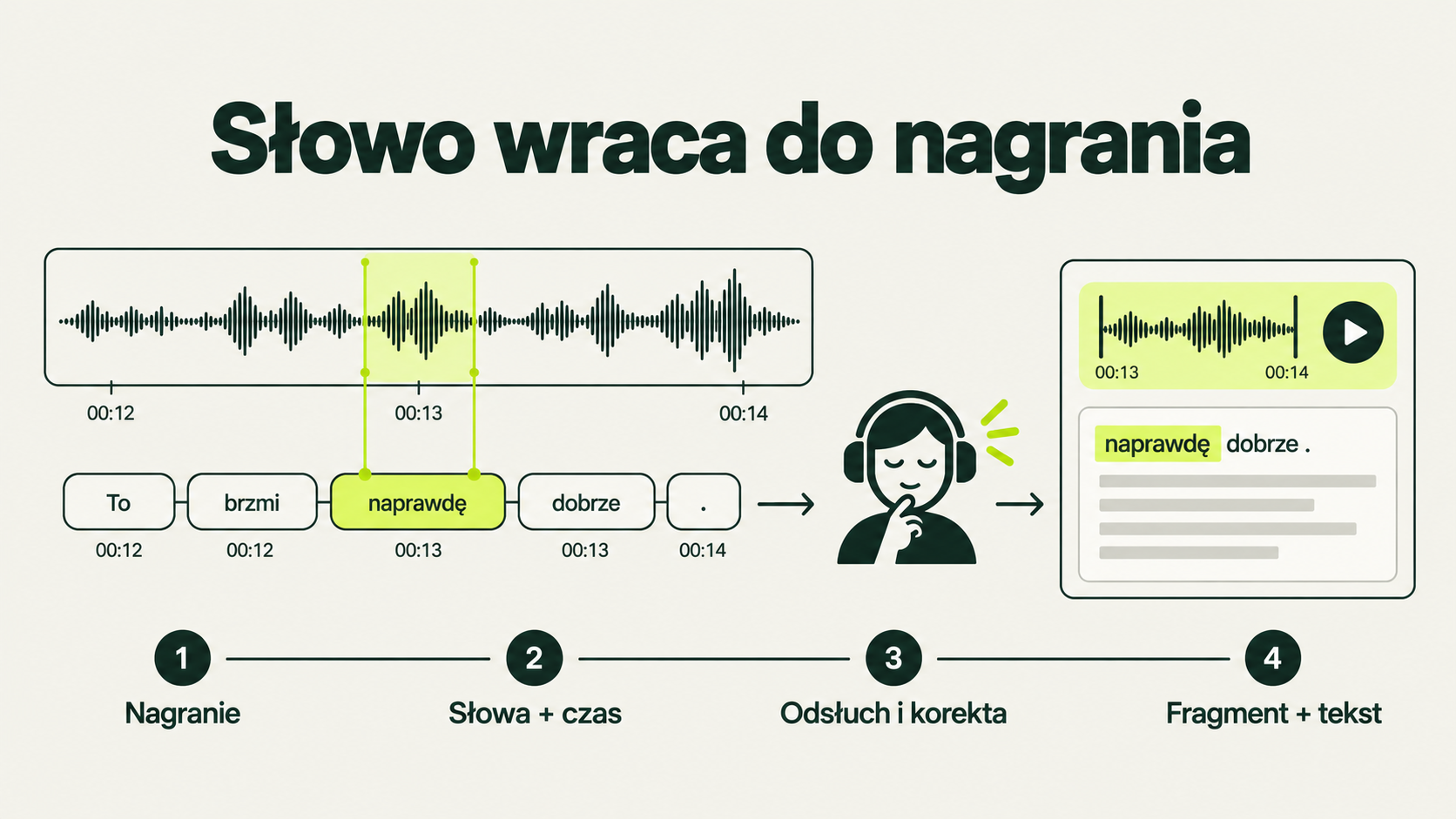
In this guide, HITL means human involvement in checking and approving a result. The presence of an approval button does not prove that someone has listened or verified the content.Section link ↗
02 / SZPIEG+
Your first piece in six steps
- Find the programme in RAMÓWKA (schedule) or an hourly file in ARCHIWUM (archive). Check the date, hour and recording name.
- Look in GOTOWE TRANSKRYPCJE (completed transcripts). Reuse an existing result instead of requesting speech recognition again.
- Click a word and listen. Check names, numbers and the beginning and end of the passage you need.
- Set IN and OUT in the transcript or waveform. If the conversation crosses a file boundary, append the required part of the next hour.
- Prepare an audio excerpt, text, subtitles or an article draft. Keep the source and time range attached.
- Listen to the result and approve it editorially. Sending it to an external service is a separate action governed by the deployment’s configuration and permissions.
You need access to a particular installation, a modern browser and headphones. The public L00P.AI demo is a lightweight imitation of the interface; it does not provide access to the production archive or editorial accounts. Interface labels below retain their Polish names so they can be found in the application.
Section link ↗03 / SZPIEG+
Find the right recording
RAMÓWKA starts with a programme name; ARCHIWUM starts with a date and hourly file. GOTOWE TRANSKRYPCJE shows work already completed. These are three entry points to the material, not three separate sources of truth. Before editing, check that the selected file matches what is playing.
Statuses matter. An archived file may have no transcript, identified speakers or chapters. Missing metadata does not mean missing audio. The current hour may still be growing, so its duration and completeness should not be treated like a closed recording.
The interface observed on 25 September 2026 also contains RAPORT DZIENNY, DZISIAJ, JĘZYK UTWORÓW, ŻYRAFA and MROWISKO. These add monitoring and processing views. A panel’s presence does not mean every day or hour has complete results. “Not confirmed” remains unconfirmed.
Section link ↗04 / SZPIEG+
Method A: the karaoke transcript
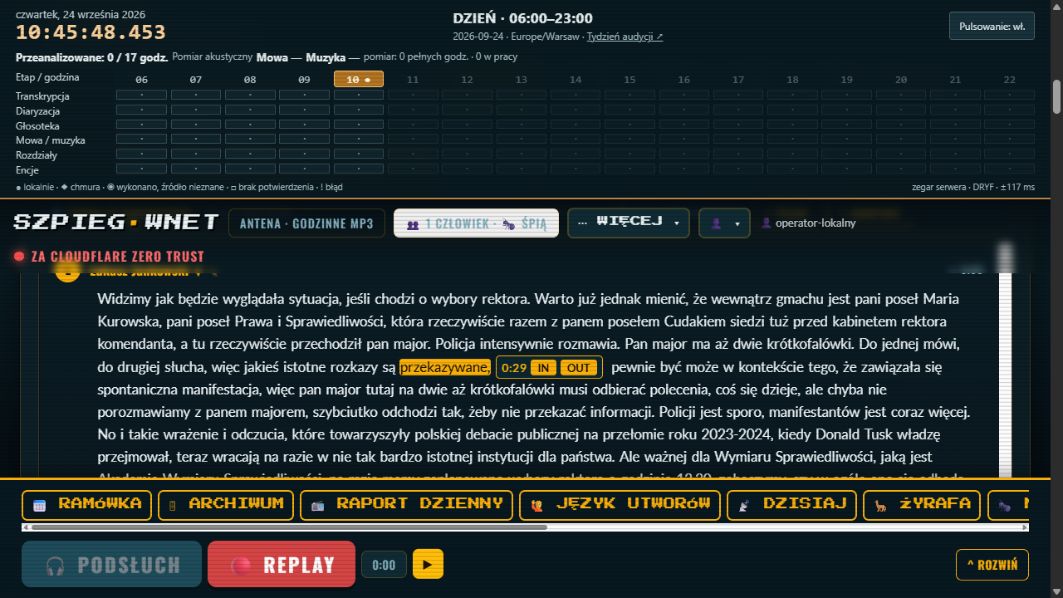
Karaoke means synchronising playback with individual words. Clicking a word seeks to its timestamp; highlighting helps follow the speaker. This makes it easier to find an argument, quotation or opening exchange without repeatedly scrubbing through an entire hour.
The documented interface uses Alt or Ctrl/Cmd with a word click to bring up boundary selection, with IN and OUT controls. Listen to both ends of the selection. Speech recognition timestamps may need correction, especially with overlapping speakers, short words or background music.
- Listen a few seconds before and after the selected statement. Removing a question or reply can change its meaning.
- Correct the transcript after listening. Wording polished for an article is editorial rewriting, not a verbatim quotation.
- If a word cannot be resolved, preserve the uncertainty and revisit the audio. A model should not fill the gap by guessing.
- On other keyboards or devices, use the visible boundary controls and the installation’s help. A shortcut does not replace checking the resulting time.
05 / SZPIEG+
Speakers: diarisation and identity
Diarisation identifies when a particular voice speaks. Identification assigns a person to that voice. “Speaker 1” and “Speaker 2” can be useful even before names are established. Voice similarity must not be presented as certain identity.
The source instruction describes suggestions from Głosoteka, the voice library, and spoken introductions, including uncertain and conflicting results. Listen to the relevant segment before renaming a speaker. Check whether a correction affects one statement, subsequent appearances or every segment assigned to that speaker. An overly broad change can attribute someone else’s words to the wrong person.
The voice library needs suitable samples and human review. Music, a second voice or noise can damage identification quality. Managing voice references and access to them is governed by the deployment’s policies; a broadcast being public does not automatically settle those decisions.
Section link ↗06 / SZPIEG+
Chapters, entities and music
A chapter marks a thematic passage; an entity organises references to people, organisations, places or other objects. These layers support navigation, search and new output formats. They do not independently verify the truth of a statement.
Music markers help describe the structure of an hour. If music is removed from the input used for transcription, timestamps must still map back to the original recording. Otherwise text could point to the wrong place. The continuation screenshot explicitly says that the music map covers only the analysed range.
Treat track titles, language, chapters and entities as fields to check before publication or reporting. Similar-sounding names and titles inferred from announcements are particularly easy to confuse. Verifying one field does not approve the whole recording.
Section link ↗07 / SZPIEG+
Method B: the waveform editor
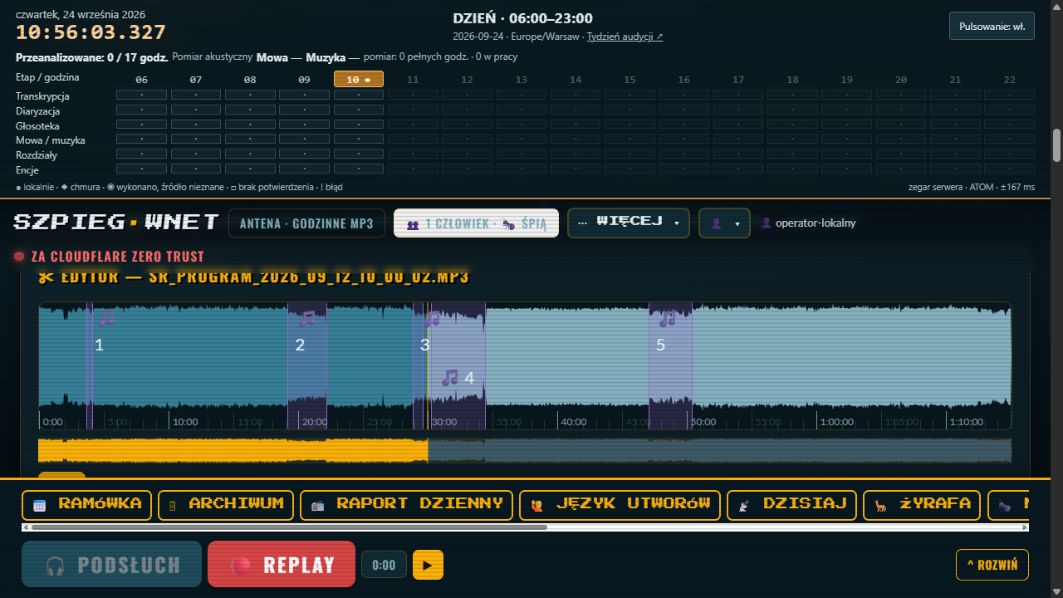
The waveform lets you select audio even without a completed transcript. It is useful for pauses, music, broadcast transitions and file junctions. The transcript helps select meaning; the waveform helps refine audible boundaries. Both methods can produce the same excerpt.
- Open the correct file in the waveform editor. Check its name and full duration.
- Select a range and set IN and OUT. Use zoom or fine adjustment where available in that view.
- Listen to the entry and exit. Avoid clipping the first consonant or the last word’s ending.
- If the passage extends beyond the hour, append its continuation before fixing the final OUT.
- Download the excerpt or add it to the fragment register, depending on the task.
The 24 September screenshot shows five marked music passages. That count belongs to this particular recording; it is not a fixed property of every hour.
Section link ↗08 / SZPIEG+
Append the next hour and cut without re-encoding
A conversation need not end with the recorder’s file. The editor offers another 15, 30 or 45 minutes, or an hour. Append the amount you need and check the junction. Recordings may contain an overlap; leaving it in place would play the same words twice.
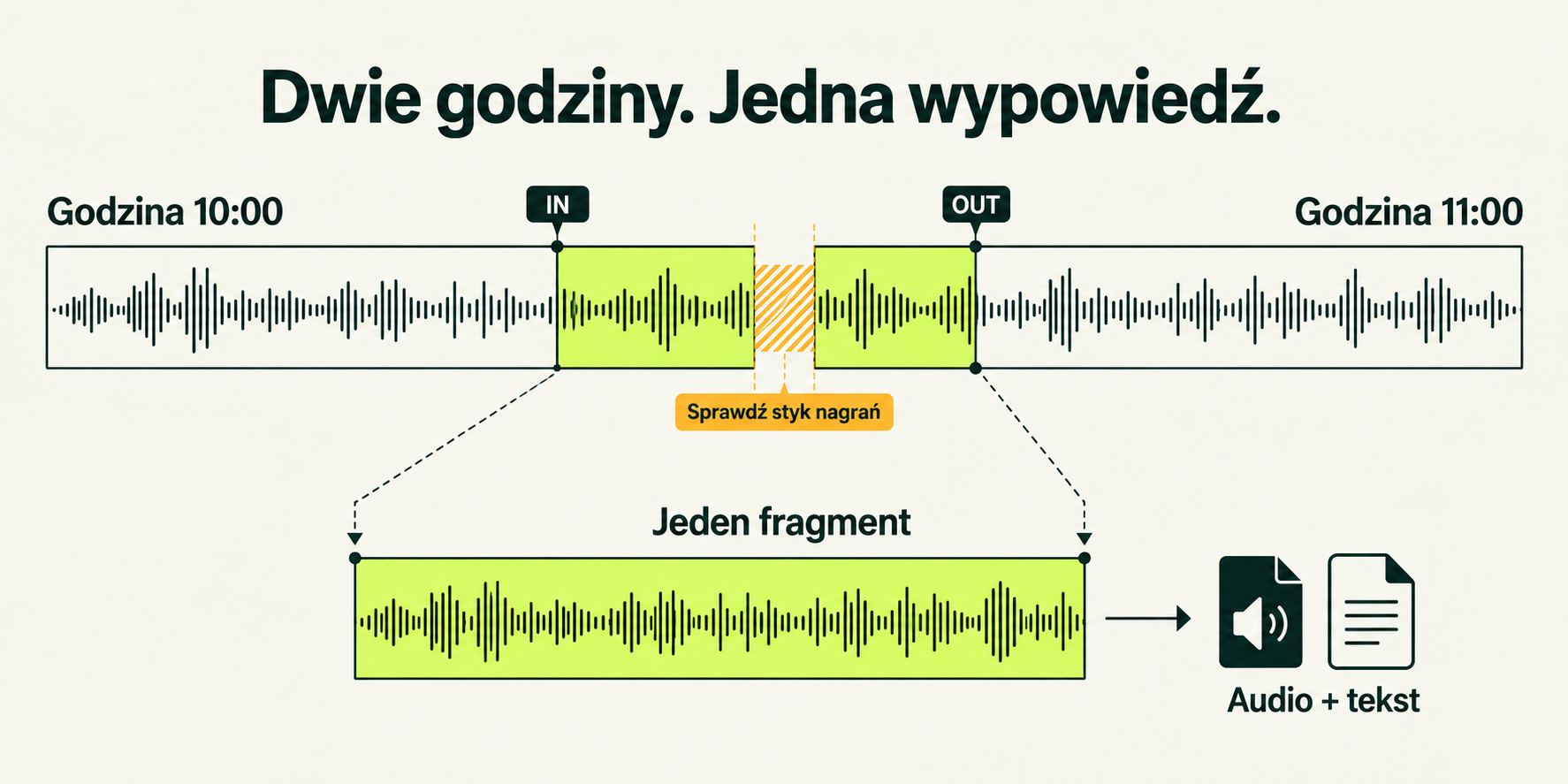
In the observed example, using recordings from 12 September 2026 at 10:00 and 11:00, the interface appended 15 minutes, reported the join at 60:05 and omitted a 5.43-second overlap. This is one observed case, not a default correction to apply to other recordings.
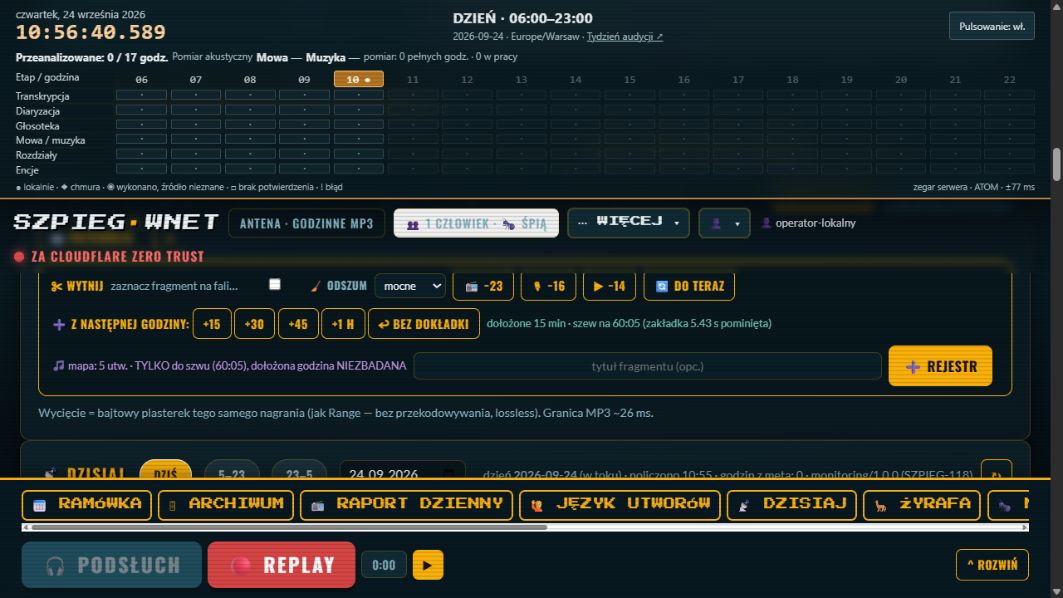
Lossless here describes the path that cuts or joins compatible compressed audio without re-encoding it. That excerpt can be prepared without rendering the sound again. MP3 boundaries still depend on codec frames; the observed interface states approximately 26 ms. This is not arbitrary sample-level accuracy.
Loudness normalisation, effects, codec changes and some editing operations may require rendering. “Lossless” does not describe every export. After adding another hour, also check the transcript, music map and other metadata for the newly added range.
Section link ↗09 / SZPIEG+
The fragment register and assembly
The register holds selected passages for further work. Give them titles that explain their content without reopening the entire hour. Preserve the source identifier, IN, OUT and intended order. With several sources, one file’s start time is not a shared clock for the whole edit.
The documentation describes assembling fragments and running editing jobs in the background. Filling the selection basket does not mean processing has finished. Check the job status, output file and duration. Listen to the joins, not just the opening seconds.
An automatically generated description or suggested order is an editorial proposal. The person approving the material remains responsible for the meaning created by juxtaposition, cuts and sequence.
Section link ↗10 / SZPIEG+
Export: audio, text, subtitles and structured data
- TXT — plain text for reading and further editing; preserve available timestamps and speaker labels.
- Markdown — a document with headings and metadata, suitable as agent context or an editorial starting point.
- HTML and browser print to PDF — readable material for someone who does not work in the application.
- SRT and VTT — subtitles based on segment timings. Check synchronisation against the exact audio or video file they will accompany.
- ninjs / structured data — content and metadata passed to another system. An exchange format is neither a finished article nor evidence of editorial approval.
- Audio — an excerpt or assembled edit. Check whether the chosen operation preserves the original compressed stream or encodes it again.
This format list comes from the deployment instruction; preparing this publication did not involve retesting every export. When moving material between tools, retain its source, recording date and correction history. The audio excerpt and text must cover the same range.
Section link ↗11 / SZPIEG+
The corpus: search, ask, return to the recording
Text search finds recorded words. Filters narrow results using metadata that actually exists: dates, programmes, speakers or entities. No result may mean a different transcription, incomplete processing or an overly narrow filter. It does not prove a topic never aired.
Asking the corpus uses retrieved context and a language model. The answer should lead to a file, segment and time. Open the reference, check whether it supports the claim, and listen to the surrounding exchange. RAG helps retrieve sources; it does not eliminate synthesis errors.
When the sources are insufficient, saying so is a valid result. A guest’s statement, an editor’s paraphrase and a finding supported by documents are different kinds of information. Preserve these distinctions in dossiers, notes and agent answers.
Section link ↗12 / SZPIEG+
From transcript to article draft
Studio Artykułu accepts selected passages or helps plan themes from an entire hour. Establish the subject and sources first, then develop the headline, opening and structure. A model can propose variants, but should not invent facts to complete the narrative.
- Select the source range. If combining several interviews, retain the provenance of each.
- Separate quotations from paraphrases. Check names, roles, numbers, dates and claims requiring another source.
- Review fidelity warnings and unsupported passages. The absence of a warning does not replace reading and listening.
- Approve the editorial work, inspect the preview and only then send a draft to the configured publishing system.
The observed ARTYKUŁ menu describes a separate studio that sends a draft to the portal. A draft is not a published article. Content approval and the publisher’s permissions remain a separate stage.
Section link ↗13 / SZPIEG+
Publication is a decision
The instruction describes WordPress, Transistor and Mixcloud integrations. Availability depends on configuration, accounts and permissions. We did not run these integrations while preparing this guide. Before sending, check the destination, channel, visibility, title, description and final file.
Distinguish drafts, restricted material and public material. An unlisted or unindexed link does not necessarily provide access control. Verify the actual sharing scope in the destination service.
Track metadata and automatically written descriptions do not establish permission to use music. Similarly, an architecture based on the standard library, or stdlib, describes code dependencies; it does not grant rights to recordings, music, models or data. Deployment terms and permitted use of material are separate matters.
Section link ↗14 / SZPIEG+
Control costs and data
Opening an existing transcript and requesting new speech recognition are different operations. Before a paid request, check existing results, the selected model, audio range and cost notice. Do not resubmit just because the result is not immediate; check the queue and previous job first.
A deployment may combine local models and external services. Fully local processing requires selecting and checking the entire path, including speech recognition, the language model and integrations. A locally hosted interface does not by itself mean that no stage sends data outside the organisation.
This guide does not freeze prices or name a permanent “best model”. Those change faster than the underlying craft. Choose using quality on your own material, available hardware, processing time and data access rules. Accounts and service credentials remain outside public documentation.
Section link ↗15 / SZPIEG+
When something does not match
- A word seeks to the wrong place: check the file, range and timeline, then listen to nearby sentences. Highlighting alone is not an accuracy measurement.
- The next hour has audio but no transcript: appended audio does not guarantee appended metadata. Check whether that file has been processed.
- A voice has the wrong name: return to the audio and identification evidence, then restrict the correction to the appropriate range.
- A join repeats or clips speech: inspect the overlap and both file boundaries. Do not copy the example’s correction value.
- A job takes a long time: inspect its status and error before repeating a paid operation.
- A convincing model answer has a mismatched quotation: retain the source, mark the problem, and correct or reject the result.
For an initial issue report, provide the material identifier, time range, action, expected outcome and actual result. Share only material the recipient is entitled to access.
Section link ↗16 / SZPIEG+
From radio craft to agent workflows
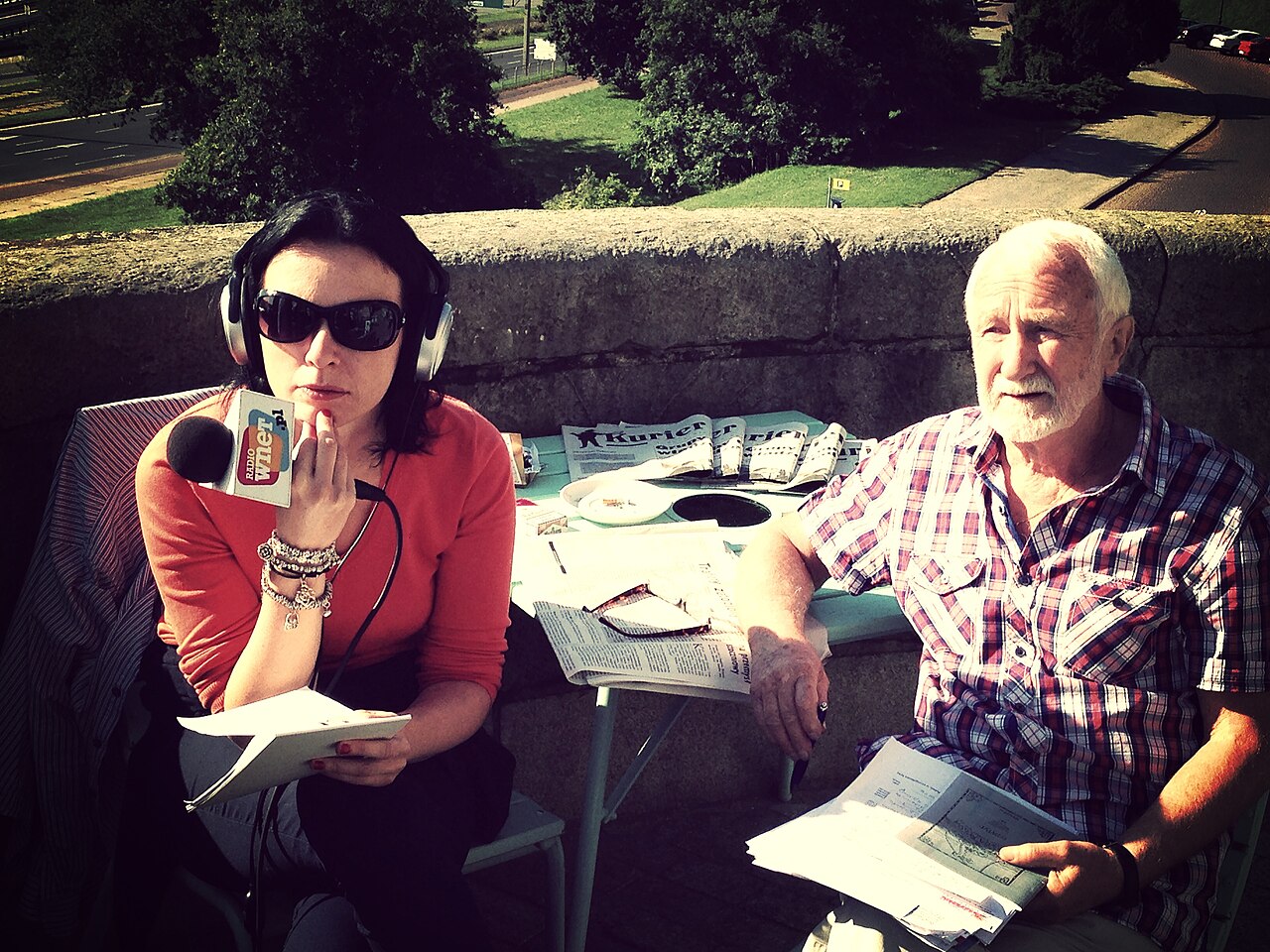
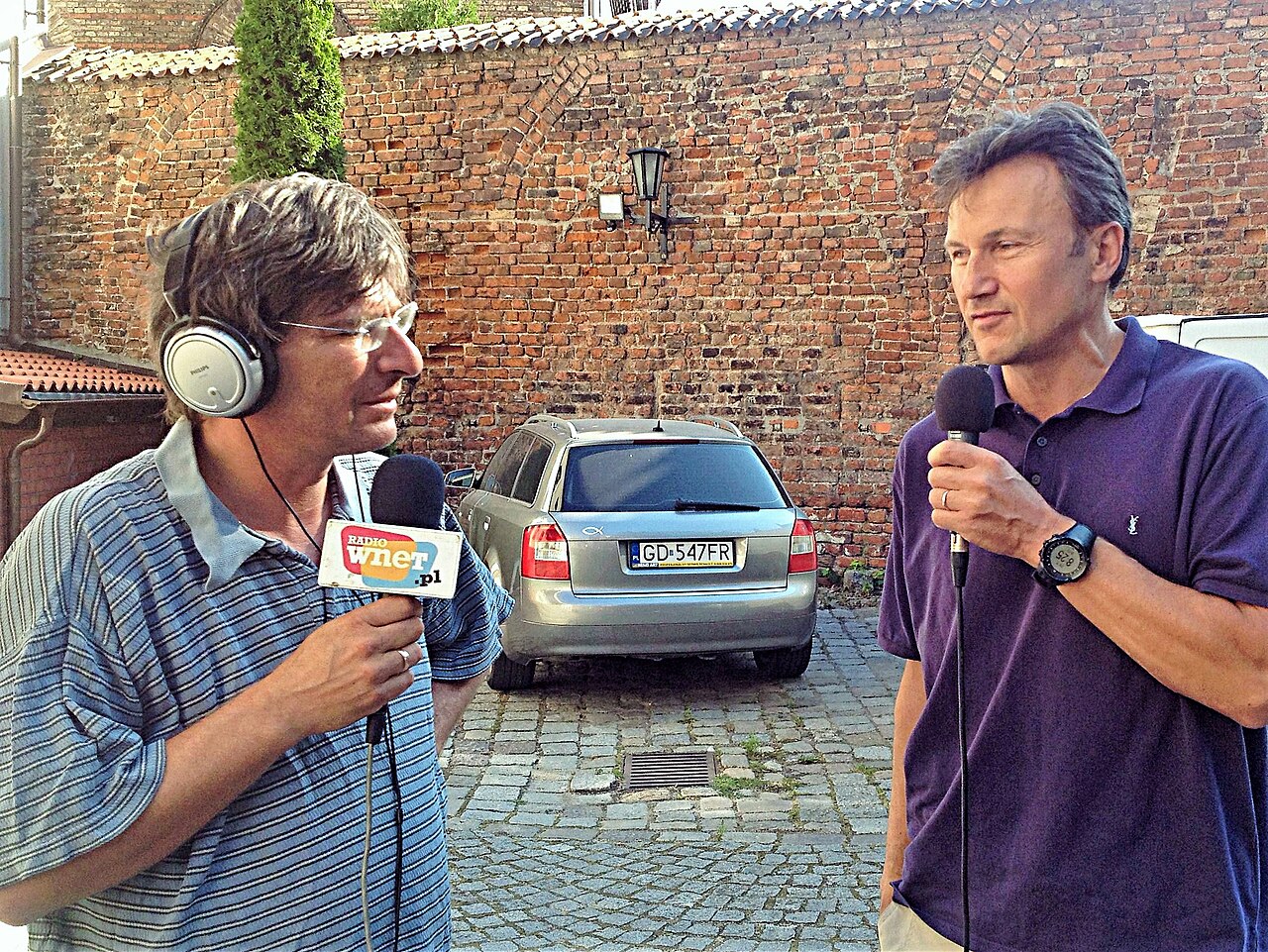
This approach grows out of working with conversation: listening, finding passages, checking quotations and building a story. The MEDIA WNET photographs below document outside broadcasts in 2013 and 2014. They show the radio context, not use of Szpieg+ at that time or a test of the current application.


In the programme developed since early 2026, L00P.AI and the team led by Lech Rustecki pass Radio Wnet and Czarne Niebo procedures and tools to agents. Proven sequences become applications that control inputs, prompt versions, model selection, outputs and the transition to the next stage.
The next direction is to use audio, its transcript and metadata as a synchronisation axis for recordings from multiple cameras, followed by agent-assisted editing and regular video-channel production. This edition presents that as a direction, not a capability verified by this guide.
Section link ↗17 / SZPIEG+
Edition, sources and the next review
Edition 1.0 · 25 September 2026. A public adaptation of the Szpieg+ editor instruction read from ZBook that day. It preserves the main workflows, reorganises the language and removes internal contacts, non-public training material, access details and outdated infrastructure descriptions. It is not a verbatim copy of the original.
Evidence has different scopes: three original screenshots and the observation record dated 24 September 2026 cover karaoke, the waveform and next-hour continuation. Reading the menu on 25 September confirms the described entry points and panels. Other workflows rely on documentation; we do not claim a fresh test of every export or integration. Infographics are labelled AI illustrations; photographs have separate sources and licences.
Updates are currently editorial, with model assistance. An accepted change to the Szpieg+ interface, instruction or workflow will trigger a review. Automatic detection of these changes is planned; no automatic updater is running and no next review date has been scheduled. A new edition requires checking changed workflows, illustration provenance and the differences before publication.
The full edition is available as Markdown and as JSON sections with permanent URLs. They can support collaborators’ public RAG. When citing this resource, keep the edition, date and specific section link. Source text is not authorisation to operate another organisation’s installation. The conceptual diagrams retain their Polish labels; their English captions explain the same process.
- Szpieg+ screenshot evidence
- Media provenance, licences and image prompts
- How L00P.AI describes its portfolio
- Try the public demo
- Discuss a deployment